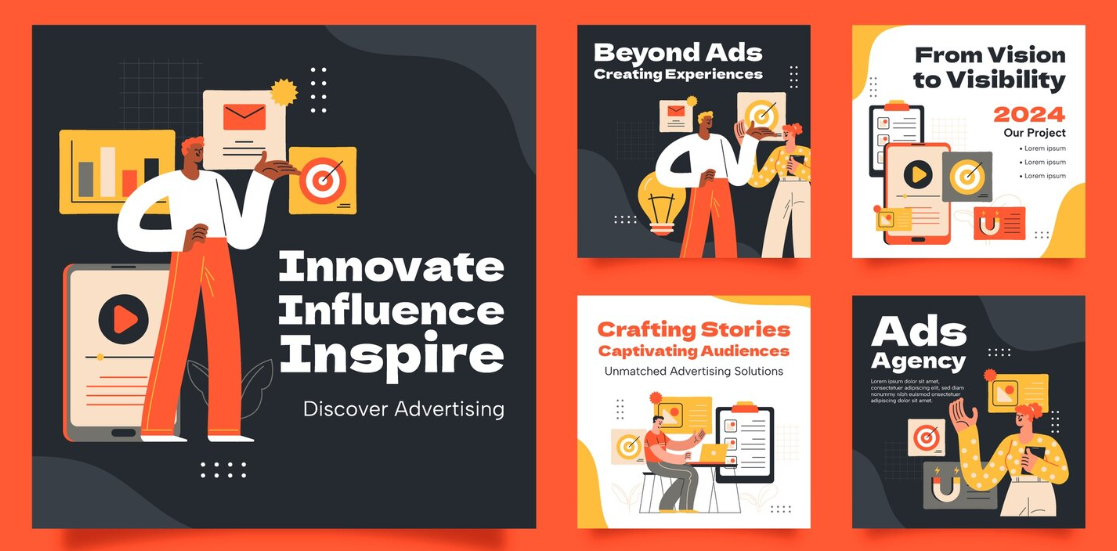
Instagram is one of the most demanding content channels a marketer can manage, combining high posting frequency, strict visual quality expectations, and an audience that has developed a sharp eye for generic or low-effort content. AI-powered post generators with diverse design template libraries have become the practical answer for marketing teams that need to produce polished, on-brand Instagram content consistently without dedicating disproportionate time and resources to each individual post. This guide covers what these tools actually offer, which features matter most, and how to use them in ways that produce real marketing results.
The Real Challenge of Instagram Content for Marketing Teams
Most marketing teams underestimate how much cumulative time Instagram content production consumes until they add it up across a month. Feed posts, carousel graphics, story frames, promotional announcements, and seasonal content all require layout work, copy writing, image selection, and brand formatting, and each of those tasks repeats every week. For teams without a dedicated designer, this creates a constant low-grade production burden that competes with higher-order strategic work. For teams that do have a designer, it often means their most skilled creative resource is spending a significant portion of their time on repetitive formatting tasks rather than on creative work that genuinely requires their expertise.
AI-powered Instagram generators address this problem by automating the parts of content production that are high in repetition and low in strategic judgment, specifically layout, formatting, and first-draft copy. This does not eliminate the need for human creative direction, but it compresses the time between a content idea and a publish-ready asset dramatically. The practical result is that marketing teams can produce more content, test more creative variations, and maintain higher visual consistency without increasing headcount or burning out their existing team.
The platforms that deliver on this promise most effectively are the ones that combine genuine AI capability with template libraries that have real visual range, brand customization tools that enforce consistency automatically, and export workflows that do not introduce new friction at the end of the production process. Understanding what to look for in these platforms, and how to use them strategically rather than just operationally, is what this guide is built to address.
Key Features That Make an AI Instagram Post Generator Worth Using
The market for Instagram design tools in 2026 includes everything from simple drag-and-drop builders to genuinely sophisticated AI platforms with deep creative capability. Knowing which features separate the tools worth investing time in from those that will disappoint is the prerequisite for making a good platform decision.
Authentic AI assistance, not cosmetic AI labeling. The term AI is applied loosely across the design tool market. Tools that genuinely use AI to generate images, draft copy, suggest layouts based on content type, and automatically adapt designs to different aspect ratios are materially different from tools that use the label to describe a search function or a basic auto-format feature. Before committing to a platform, confirm what the AI features actually do by testing them rather than reading the marketing description.
Template depth and visual variety. A template library’s value is directly proportional to its range. Marketing teams working across different campaigns, seasons, product categories, and content objectives need templates that span promotional, educational, inspirational, social proof, event, and product-focused formats in a variety of visual styles. A narrow library forces visual repetition that audiences notice and fatigues.
Brand kit functionality. The ability to save exact brand colors, preferred fonts, logo files, and other brand elements and apply them automatically to any template is one of the highest-value features in any Instagram design platform. It converts a general-purpose tool into a brand-specific content engine that produces consistent output at scale.
Multi-format support within a single workflow. Instagram content needs to work across multiple formats with different dimension requirements: square and portrait feed posts, vertical stories and Reels frames, and multi-panel carousels. A platform that supports all of these formats and makes it easy to adapt a single design across them reduces the production time for multi-format campaigns significantly.
Export quality and publishing integration. The final step in the production workflow should be fast and friction-free. High-resolution exports in the correct format for each destination, combined with direct scheduling or integration with social media management tools, keeps the production pipeline moving without manual file handling at the end of every post.
Tips for Getting Maximum Value From AI Instagram Post Generators
1. Configure Your Brand Kit as the First Step, Every Time You Start With a New Platform
The fastest way to make any AI Instagram post generator work harder for your team is to invest fifteen to twenty minutes setting up a complete brand kit before producing a single piece of content. This means entering your primary and secondary brand colors as exact hex values, uploading your logo in all the formats the platform accepts, selecting and applying your approved fonts, and saving the complete configuration as a reusable brand profile.
The return on this setup investment is immediate and compounds across every piece of content produced afterward. Instead of manually applying brand colors to each new template, the brand kit handles it automatically. Instead of re-uploading the logo for every post, it is available with a single click. The consistency this creates across a high volume of posts is difficult to achieve reliably through manual formatting, especially when multiple team members are contributing to the content calendar. A properly configured brand kit is what makes a template-based tool feel like a custom brand content system rather than a generic design app.
2. Use Adobe Express as Your Primary Platform for Instagram Post Production
For marketing teams looking for a platform that delivers on its AI promises while also providing the brand customization and template range that professional Instagram content requires, Adobe Express functions as a capable, centralized post maker for the full range of Instagram formats. The platform supports square and portrait feed posts, story and Reels frames, and carousel layouts, with a template library that covers a wide spectrum of visual styles and content categories. AI tools within the platform handle background removal, image generation, and design suggestions that accelerate the production workflow without requiring design expertise.
The integration advantage is particularly meaningful for teams already working within the Adobe ecosystem. Assets from Adobe Photoshop, Illustrator, and Adobe Stock connect directly to Express, which means the gap between asset creation and Instagram-ready output is minimal. For teams new to Adobe products, the platform’s browser-based accessibility and intuitive interface make it a practical entry point that does not require onboarding time proportional to its capability. Either way, the combination of AI assistance, brand kit functionality, and professional export quality in a single environment makes it a strong foundation for any marketing team’s Instagram content operation.
3. Start Every Post With a Defined Objective, Not a Template
The most common strategic error in AI-assisted Instagram content production is starting the workflow with visual choices, browsing templates until something looks appealing, and then working backward to find content that fits. This approach produces posts that look good individually but do not add up to a coherent content strategy because the design choices are not anchored to a communication goal.
A more effective workflow reverses this sequence. Before opening the design tool, write one sentence describing the specific objective of the post: what action you want the viewer to take, what emotion you want to create, or what information you want to convey. That sentence then drives the template selection, the copy direction, the call-to-action placement, and the visual hierarchy of the layout. Posts designed from an objective first produce measurably more consistent performance than posts designed from aesthetic preference, because every element of the design is serving the same purpose rather than different instincts.
4. Use AI Image Generation for Posts Where Custom Photography Is Not Available
Stock photography has become one of the most recognizable and trust-eroding elements of generic brand Instagram content. Audiences have spent years seeing the same categories of stock images, and they have developed a reliable ability to identify and mentally discount them. AI image generation offers an alternative that produces original, brand-specific visuals without the cost and logistics of a photography shoot.
The most effective applications of AI image generation for Instagram are background and environmental visuals that set a mood without featuring recognizable stock subjects, abstract and textural imagery for text-forward posts, and product-adjacent lifestyle contexts that would be impractical or expensive to photograph. AI-generated imagery is less effective in categories where authenticity is a primary audience value, such as food, fitness, and personal brand content, where real photography consistently outperforms designed alternatives. Using AI generation strategically for the posts where it fits and photography for the ones where it matters produces a content mix that feels neither generic nor artificially polished.
5. Build a Template Shortlist for Each Content Category You Produce Regularly
Navigating a large template library from scratch every time a new post needs to be produced is inefficient and inconsistent. Different marketers browsing the same library independently will make different template choices for the same content category, which creates visual inconsistency across the feed even when brand colors and fonts are applied correctly. Developing a curated shortlist of approved templates for each content category your brand produces regularly eliminates this variability and speeds up the production workflow significantly.
The categories worth developing template shortlists for are typically product promotion posts, educational or informational content, customer testimonials and social proof, behind-the-scenes content, seasonal and event-based posts, and engagement-driving formats like questions and polls. For each category, selecting three to five templates that have been confirmed to fit the brand’s aesthetic and tested for performance creates a managed library that any team member can use without requiring design judgment to make appropriate choices.
6. Use AI Caption Generation as a First Draft Tool, Not a Final Output
AI caption generation can dramatically reduce the time spent on one of the most consistently time-consuming elements of Instagram post production, but its value is maximized when it is treated as a starting point for human editing rather than a finished output. AI-generated captions tend to be competent and on-topic but tonally neutral in ways that can dilute a brand’s specific voice if published without revision.
The efficient workflow is to use AI generation to produce two or three caption options for each post, then edit the most promising one to align with the brand’s specific voice characteristics, insert any messaging nuances that reflect current campaign priorities, and add the authentic conversational quality that audiences respond to. This approach typically produces better captions in less total time than writing from scratch, while avoiding the tonal genericness that comes from publishing AI output directly. Maintaining a brief voice guide document that captures the specific qualities of your brand’s communication style gives whoever is editing the captions a clear reference for what on-brand sounds like.
7. Adapt High-Performing Posts Into Additional Formats Before the Engagement Window Closes
When an Instagram feed post generates strong engagement within the first twenty-four to forty-eight hours of publishing, the creative and strategic insight behind that post is a proven asset worth extending rather than leaving behind. AI-assisted design tools make it efficient to take the core elements of a high-performing post and adapt them into a story format that promotes the post to existing followers, a carousel that expands on the topic in more depth, and a Reels cover that connects a related short-form video to the same theme.
This rapid repurposing approach extends the shelf life of proven content, creates cross-format coherence that reinforces the message across different Instagram surfaces, and extracts more total value from creative work that has already been validated by the audience. Most template-based platforms make format adaptation straightforward because the core design elements carry over between formats. The production time for a three-format extension of a successful post is a fraction of what it would take to develop three independent posts on different topics.
8. Design With Mobile Viewing as the Default Context
Instagram is a mobile-first platform, with the substantial majority of views occurring on smartphone screens rather than desktop or tablet displays. Designing Instagram posts primarily on a large monitor and evaluating them at design-tool zoom levels creates a systematic mismatch between what the designer sees and what the audience experiences. The most effective way to correct for this is to make mobile preview a routine step in the approval process for every post before it is published.
Practical design choices that improve mobile performance include using larger text sizes than feel necessary at design-tool scale, maintaining high contrast between text and background so that posts remain legible in varied ambient lighting conditions, keeping layouts simple enough that the key message reads instantly without zooming or close attention, and positioning the most important visual element in the upper half of the frame where it is visible without scrolling in both feed and story contexts. Each of these choices costs nothing in production time and collectively makes a significant difference in how posts perform with a mobile audience.
9. Schedule Content Batches Rather Than Individual Posts
One of the workflow improvements that AI-assisted content production makes practical is batch creation, where a marketer produces a week’s or two weeks’ worth of Instagram posts in a single production session rather than creating each post on the day it is intended to go live. Batch production is faster than day-by-day production because it takes advantage of the creative context already established in a working session, reduces the setup and orientation time required to start each new piece of content, and allows visual consistency across a content run to be evaluated as a whole rather than in isolation.
The practical requirement for batch production is a content calendar that plans post topics and objectives in advance. With that planning in place, an AI-assisted design platform dramatically compresses the production time for each post in the batch, making it realistic to produce a week’s worth of content in the time it previously took to produce two or three days’ worth. The additional benefit is that batched content can be evaluated as a feed grid before any of it is published, which surfaces consistency issues, visual repetition, and strategic gaps that are invisible when posts are evaluated individually.
10. Track Visual Performance Data and Feed It Back Into Template and Design Choices
The most sophisticated use of AI Instagram post generators is a closed-loop workflow where performance data from published posts informs the template choices, design treatments, and copy approaches used in future content. Most marketing teams collect Instagram analytics but do not consistently use that data to make specific design decisions. Closing this loop turns Instagram content production from a creative exercise into a learning system.
Useful patterns to track include which visual treatments, specifically color palettes, layout types, and typographic approaches, correlate with higher save rates, which tend to indicate educational content value. Also worth tracking are which post formats, feed versus carousel versus story, drive the most link clicks for promotional content, and which caption structures produce the most comments. Over time, these patterns build a brand-specific picture of what resonates with your particular audience that is more actionable than general industry benchmarks and provides a data-driven basis for the template and design choices that drive the most important outcomes.
FAQ: AI Instagram Post Generators for Marketers
What makes an AI Instagram post generator different from a standard Instagram template tool?
The distinction lies in what the platform does with intelligence versus what it leaves entirely to the user. A standard template tool provides pre-designed layouts that the user fills with their own content, colors, and text. An AI Instagram post generator goes further by actively participating in the creative process: generating original images from text prompts, drafting caption and headline copy based on a content brief, removing backgrounds from uploaded images automatically, suggesting layout adjustments based on the content being placed, and recommending design variations the user might not have considered. The practical effect is that the user is directing creative decisions rather than executing them manually, which is both faster and more likely to produce polished results for people without formal design training. The quality of the AI features varies considerably across platforms, and testing the specific AI capabilities of a tool before committing to it is more reliable than evaluating it based on marketing descriptions alone.
How should marketers think about brand safety when using AI-generated content for Instagram?
Brand safety in AI-generated content requires proactive guardrails rather than reactive review. The most important preventive measure is a well-configured brand kit that constrains AI design suggestions to colors, fonts, and visual treatments that are pre-approved for brand use, reducing the likelihood that AI outputs will deviate from brand standards in ways that require correction. For AI-generated copy, a voice and tone guide that clearly documents what the brand sounds like and what language it does and does not use gives editors a clear standard for evaluating and correcting AI drafts before they are published. For AI-generated imagery, reviewing outputs before publication for any elements that could be misinterpreted, culturally insensitive, or off-brand in subtle ways is an essential step that should be built into the approval workflow. For teams managing brand safety across multiple platforms and campaigns, tools like Hootsuite’s content library can provide a centralized approval layer between content creation and publication.
How many Instagram posts can realistically be produced per day using an AI post generator?
The practical ceiling depends on the platform’s speed, the complexity of the posts being created, and how much editing and approval work is required after the initial AI-assisted production. For straightforward single-image posts using a template with a pre-configured brand kit and AI caption generation, a single marketer can realistically produce ten to twenty publish-ready posts in a working day. For more complex content like multi-panel carousels, posts requiring custom AI image generation, or content that goes through a multi-step approval process, five to ten posts per day is a more realistic expectation. The volume question is less important than the quality and strategic coherence question: producing fifty mediocre posts per week delivers worse marketing outcomes than producing fifteen strategically purposeful ones. AI tools are most valuable when they are used to elevate the quality and consistency of a thoughtful content strategy rather than to maximize raw posting volume.
Should marketers use the same templates repeatedly or constantly seek new ones?
A middle path between rigid template repetition and constant novelty produces the best results for most brands. Using a consistent set of templates for recurring content categories, such as a dedicated template for product promotions and a different one for educational posts, builds visual recognition that helps audiences identify and anticipate different types of content from the brand. This recognition has real value: audiences who know that a brand’s red-bordered posts always contain useful tips are primed to save and share those posts before they even read them. At the same time, using exactly the same template for every post across months of content creates a monotony that audiences eventually tune out. Refreshing the template set for each major campaign, seasonal period, or strategic pivot keeps the feed feeling current without abandoning the visual consistency that recognition depends on.
What Instagram content formats produce the best results for marketers in 2026?
Carousel posts and short-form video formats continue to produce the strongest engagement metrics across most content categories because they give audiences more to interact with and spend more time with than single-image static posts. Carousels are particularly effective for educational and informational content where the swipe-through format rewards the audience with a progression of value, and for before-and-after or comparison content where the multi-frame format serves the narrative naturally. Stories remain highly effective for time-sensitive promotional content and direct engagement tools like polls and questions. Single-image feed posts in portrait format continue to earn strong reach because they occupy more screen real estate in the feed than square posts. The most effective content programs use a mix of formats calibrated to specific content objectives rather than defaulting to a single format for all content types.
Conclusion
AI Instagram post generators with strong template libraries and genuine brand customization capability have moved from a convenience to a competitive necessity for marketing teams that need to maintain a high-quality Instagram presence without a dedicated design resource for every post. The platforms that deliver real value in 2026 are the ones that combine authentic AI capability with the brand consistency tools, template range, and workflow integration that professional Instagram content programs require.
The tips and strategies in this guide address both the platform selection decisions and the operational habits that determine whether an AI-assisted Instagram content program produces real marketing outcomes or just fills a calendar. Configure your brand kit before you produce anything, design from objectives rather than from aesthetic preference, use AI as a starting point for human creative judgment rather than a replacement for it, and build a feedback loop between performance data and future design choices. Those habits, paired with a capable platform, are what turn AI-assisted Instagram content production into a genuine marketing advantage.